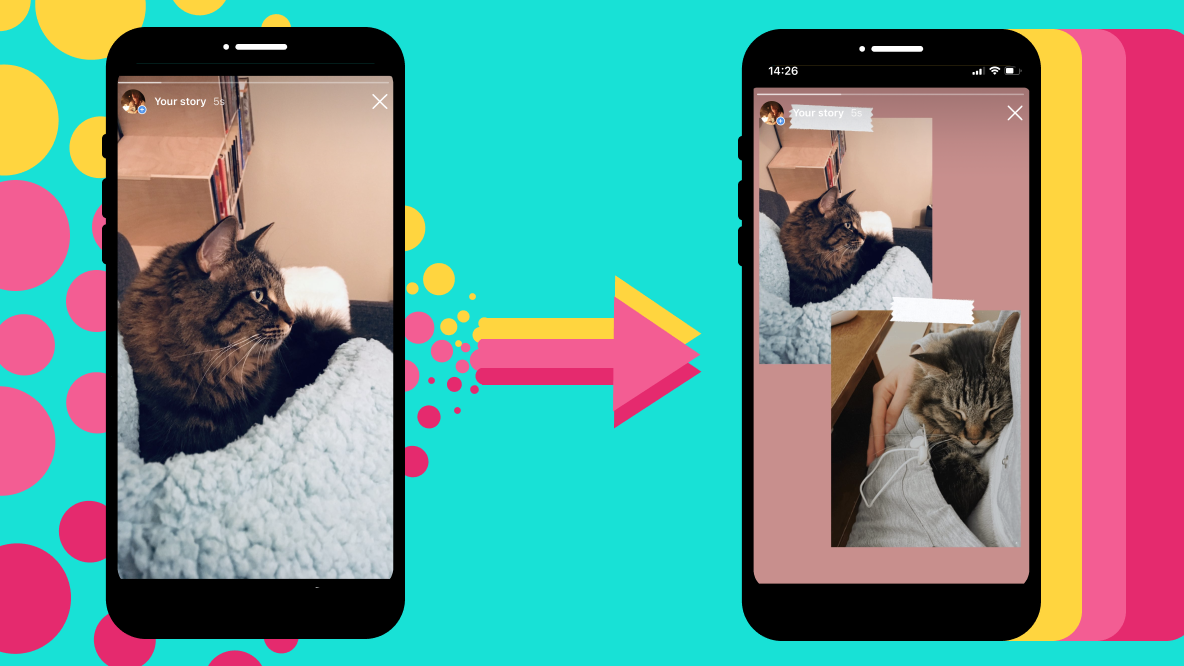
You don't have to leave your followers hanging for the rest of your story. You can add multiple photos to an Instagram Story. This is a quick and easy way to give your followers an inside look at what you are up to, while curating a more detailed narrative in one go. How cool is that? Want to know how? Well then, you've come to the right place! We'll go through all the steps and tips you should know about adding multiple photos to your Instagram Story. It's incredibly simple once you know where and how. Each slide shows who has seen it. To make that list longer, there are Instagram Story views in the Subscriberz shop.
How to Add Single Photos to Instagram Story
Adding a single photo to your Instagram Story is easy as pie. All you need to do is open up the Instagram app and go to your Stories tab. Then, click on the camera icon at the bottom left of your screen and select the photo you want to upload. Once you’re satisfied with your snap, simply hit “Share” and voilà—your story will be live!
Alternatively, you can upload a photo directly from your camera roll: just swipe right and hit “Library” at the top of your screen. Select the photo you want to share and then hit “Next” when you’re done. This will bring up several editing options, such as adding text or stickers, cropping or rotating your photo, or even adding a filter. Once you’ve finished playing around with all the creative possibilities, simply press “Share” to upload it to your Story!
How to Upload Multiple Photos to Instagram Story
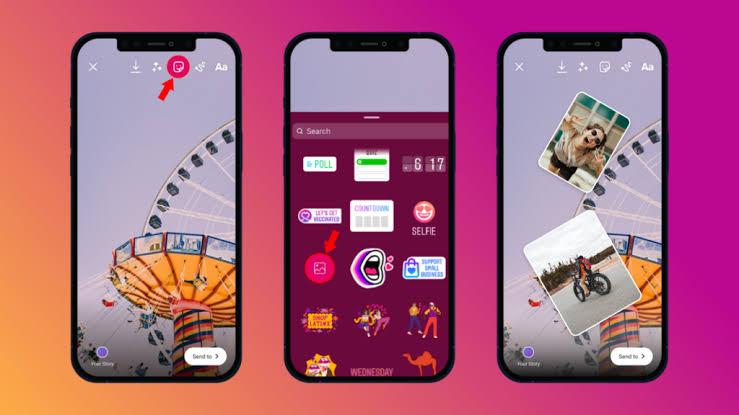
It's actually really easy to add multiple photos to your Instagram Story—all you have to do is upload them one at a time. In fact, you can upload up to 10 photos or videos in one go. Here's how:
- When sharing from your story, select the multiple photo icon (it looks like stacked squares).
- Choose the number of photos from one to ten that you’d like to upload, tap Done and then confirm each photo by tapping ‘Add'.
- You can also edit each photo before adding it to your story using the edit options at the bottom of the screen, like stickers or filters.
- When all of your photos are ready, just go right ahead and post them! You can also see a preview of how your multi-photo post looks before publishing it by tapping on "Preview" in the top right-hand corner.
It's as simple as that! With this trick up your sleeve, you're sure to be creating awesome-looking stories with multiple images in no time at all.
Benefits of Adding Multiple Photos at Once
Adding multiple photos to your Instagram Story is a great way to tell a story, show off your daily life, or just have fun with your followers. It's easy and it can save you time - instead of posting the same photo several times, you can upload them all at once. Plus, it makes for a much more interesting display!
The best part is that your followers can tap through the whole series in one go, so your story shows a complete little story instead of a single moment. And since stories are only up for 24 hours, it's easier for followers to catch up with everything at once.
Adding multiple photos also gives you an opportunity to get creative with captions and effects. You can use text overlays, stickers, and other fun effects across your images to make them stand out even more. This can be especially helpful if you're advertising products or services - instead of just one photo with some words, now you have the opportunity to really showcase what it is that you offer in an engaging way!
Tips for Creating a Consistent Esthetic With Multiple Photos
Truly great Instagram Stories don't just look cool, they also carry an overarching esthetic — one that's consistent across the entire story. Here are a few tips to help you make sure your multiple photos look good together and create a consistent esthetic:
Pick a theme
When dealing with multiple photos, starting off with a theme helps tie them all together and gives your story a stronger esthetic. Try picking a color palette or adding some sort of pattern or motif to the photos, like words or shapes.
Choose your frames wisely
The frames are just as important as the photo itself. You want each individual frame to stand out but also flow into the next one seamlessly. Pick interesting frames that compliment each other to make the most impact when adding multiple photos at once. Plus, Instagram stories have some great built-in frame options—from bold borders to fun effects—that can really make your story pop!
Utilize grids
You can use grids to arrange multiple images into one larger image for a bigger impact in your Instagram Story. For example, you could go for something like 2x2, 3x3 or 4x4 if you have more than one photo you want to add at once. This will give you lots of flexibility in terms of having multiple visuals that work together but still stand out on their own.
Creative Ways to Use Multiple Photos in Your Instagram Story
Organizing multiple photos in your story can be a great way to show off products, capture moments, or focus on a specific event — and there are several creative ways to do it. From using the same backdrop to telling a story through progression, learn how you can add multiple photos within your Instagram Story.
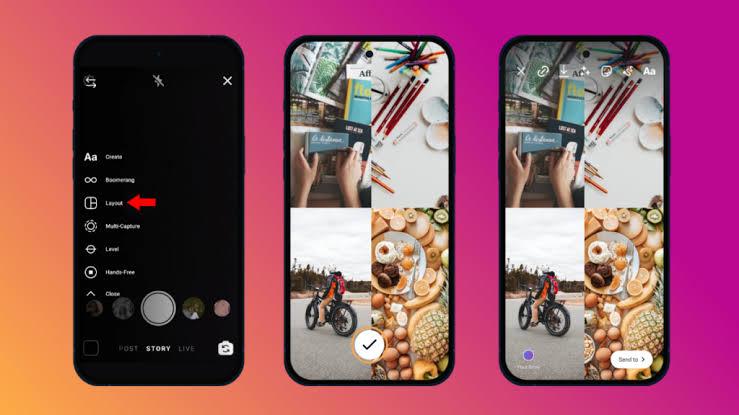
Layout Grid
When you add several photos at once, Instagram turns each one into its own slide. If you'd rather show them together, use Layout in the Stories camera. It puts several photos into one grid, which works well for products shown from different angles, before and after shots, or the highlights of an event.
Best Practices for Posting Multiple Photos to Instagram Stories
When it comes to sharing multiple photos on your Instagram story, there are a few best practices you can use to get the most out of your post. Here are some tips to keep in mind:
- Think of the overall look and feel that you want to create when deciding on the photos to include and how they'll fit together.
- If you're posting a series of photos, consider adding an animation or transition effect between them. This will make it more visually appealing for your audience as they scroll through your story.
- Know when to stop! You can add a lot of photos to your story, but nobody wants to tap through 40 slides. Pick the ones that add the most value.
How to Add GIFs to Your Instagram Story
Adding GIFs to your Instagram Story can help spice up your Story and give it a bit more flair. All you have to do is select the sticker tool and search for the GIF you want to use. Instagram offers a variety of preloaded GIFs from GIPHY, as well as an additional library of custom branded GIFs from brands like Marvel, NBA and more. As a bonus, you can even add custom GIFs designed by other users to your story — all you have to do is search for them! Selecting a GIF couldn't be easier—simply tap the one you want to include in your Story, and then adjust its size and position by pinching or dragging it around the screen. You can also add text or stickers if desired. Once it's exactly where you want it, just tap “Done” to add it to your Instagram Story!
How to Animate Your Multiple Photo Story
Now that you've found a way to add multiple photos to your Instagram Story, you can also add some animation to it! Animation can help make your story more dynamic, and one of the most popular ways to do this is by using the ‘Layout’ feature.
Layout is built right into the Stories camera. Tap Layout on the left side, choose a grid and fill each square with a photo. Once you are happy with how it looks, add music, text or stickers to make the collage feel more alive. With this feature, you can show different moments from your day or an event in one frame, so viewers see them all at once.
Editing Apps for Sprucing Up Your Instagram Story
Editing apps are your best friends when it comes to adding multiple images to your Instagram Story. When creating something special, it's all about the details! Editing apps allow you to really bring out the impact of your Instagram Story. You can adjust lighting, add filters or text, and make all other creative tweaks. Some popular editing apps that you can use to spruce up your Instagram Story include:
- Adobe Photoshop Express: An easy-to-use app with a slew of versatile tools that can help you create the perfect image for your Instagram Story.
- VSCO: This app is great for adding filters and effects to make your photos pop on Instagram Stories.
- Snapseed: With Snapseed you can adjust color hues, saturation, brightness and sharpness for a professional finish every time.
- Canva: Easily create layouts directly in the app by adding multiple photos into one frame for maximum impact on your story!
With so many options available, editing apps open up a world of possibilities when it comes to creating stunning visuals for your Instagram Story with multiple photos.
Conclusion
So if you want to be a power user and show off more than one picture in your Instagram Story, you now have the tools to do so. Whether you're sharing multiple photos from a single event or want to layer multiple photos together to create a collage, the tools are now much easier to use and can create a stunning impact for your followers. Try experimenting with different layouts and filters to find the best combination of images to express yourself and your message. With multiple photo stories you can spice up your Instagram with a unique and more engaging story. All you have to do is choose the right photos and stories to add, and you'll be sure to capture the attention of your followers.