
X (formerly Twitter) is a popular platform for industry thought leaders, professionals, and key players. That means when building a social media outreach program, it should be among the top platforms to consider.
When conducting X outreach, one feature you should highlight is X (Twitter) Chats, which can be a powerful tool for building brand awareness, driving real-time engagement, and fostering better networking with experts in your niche. In this article, we look at how to use X chats for your outreach program.

What are X chats?
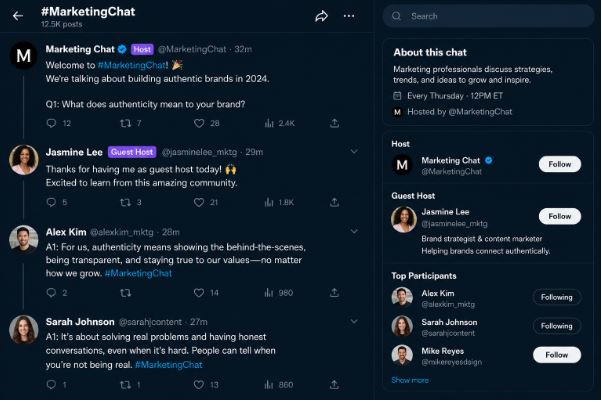
An X chat is a scheduled, recurring X conversation hosted by an X account that revolves around a particular topic. In most cases, it is a regular event that happens weekly, after two weeks, or monthly, but it always happens at the same frequency. No matter the industry you are in, you can find an X chat, making the feature a great choice for diving deeper into a particular subtopic, connecting with your target market, and helping you make money selling on X.
To set up a Twitter chat, begin by defining the conversation topic and the relevant questions all participants will need to answer. Each chat has a regular host or a guest host, who is responsible for guiding the conversation, and they can ask a question before interacting with the respondent’s answers. All Twitter chats feature their own hashtags that participants should include in their tweets and replies. The hashtag will at times be the chat’s name, such as #TwitterSmarter, #CMWorld, and #ContentChat.
For instance, Adweek’s #AdweekChat was a long-running weekly chat that dove deeper into topics such as advertising thought leadership, revolving around a particular theme each week.
How Twitter Chats Work
Twitter chats can last 30 minutes to 1 hour, so users of the chats need to prepare for the questions in advance, which can range from 5 to 15, depending on their level of detail. When formatting the question, the host will usually begin with “question 1” or another number indicating the exact question they are on.
Every question features hashtags and the answer tweets to enable the participants to take part in the conversation. Just like live, in-person discussions, chats usually start with an introduction and end with an endnote. People use these tweets to interact with one another, meet new X friends, and have deep conversations.
How to Participate in X Chat
It's easy to get started with the Twitter chat, as all you need to do is appear. But to become a pro in X chats, use the following tips:
- Arrive on time. When you are late for the X chat, it is fine to try to catch up. However, you should avoid being too late.
- Invite friends. Promote the chat on your wall and invite friends to participate.
- You can now introduce yourself to break the ice and network.
- Follow the host and greet them.
- When you come across participants with interesting bios that look like people you can outreach to, follow them.
- Use the right formatting when answering questions such as A1 and A2. If you don't have enough space to answer in a single tweet, you can use A1B, A1c, etc.
- Respond to the answers of other participants.
- Where possible, add GIFs.
- If videos are your greatest strengths, you can respond with a short one. You can leverage the X camera for doing that,
- When the chat ends, thank the participant and note the hashtag for the next one.
How to Participate as a Guest Host
Once you have ample experience of participating in chats, you will come across a few people along the way. When you find a chat that resonates with you, your brand, or your industry, you can reach out to the owner to appear as a guest in one of their chats. If you are accepted as a guest, you will be invited weeks before the assigned X chat so you can liaise with the owner about what to discuss.
In most cases, you will need to agree on the question so you can prepare your answers. The owner will add you to the promotional graphics to be shared in the chat. On the actual day of the chat, you will participate as a regular guest. You will be asked questions, required to respond, and even to retweet the favorites.
The only difference is that the owner will present you as a guest host, and you will be required to respond to questions in your capacity as an industry thought leader. You will be expected to teach participants industry lessons, so you need to be prepared. It can, therefore, be a good opportunity to position yourself as an industry thought leader, helping you to manage brand narrative in the digital environment.
How to Host an X Chat
Once you understand how X chat works and have enough followers on your account, you can go ahead and host your own. This can be a great step toward generating social media visibility. However, for the X chat to be successful, you need to be consistent and always be ready to show up. After that, you can follow these steps:
Choose a Name, Time, and Hashtag
You need to begin by choosing a name and a hashtag for the Twitter Chat. You can use a brand name for your chat name, or use the industry name followed by 'chat'. You can then select the perfect date and time that differs from those used by other brands and creators in your industry. You don't want a situation where your chat competes with the already established chat.
Promote the Chat
Unless you inform people about your chat, they will not attend. Therefore, you will need to take time to promote it in the same way you promote your products or services. While X should be the main place to promote the chat, you can also consider other platforms. Here are some ideas for doing that effectively:
- Create graphics for the chat. A good idea would be to create a template so you only need to change the topic title and the guest's details. You can add the date, time, and hashtags. Remember to include your brand color and logo as well.
- Share the hashtag in your X profile.
- Promote the chat in the newsletters.
- Share about the chat on LinkedIn and Facebook.
- Consistently share on X.
In Conclusion
Twitter chats can be a great tool for building your outreach and networking. However, you need to take the time to learn how it works by attending other chats, appearing as a guest, and finally hosting your own chat. Follow the steps above to start using X chats.


