When YouTubers post videos on YouTube, they expect the views to be continuous. However, they are surprised when this doesn't happen. After posting a few videos, they realize their views remain zero. Considering that more than 500 hours of video are uploaded to YouTube every minute, the competition can get stiff.
However, you will realize that there are YouTube videos that gain thousands of views immediately after they are posted. This means that there must be something that such video creators are doing right for them to attract such a high number of views in such a short time. This article will guide you on how to attract views to your YouTube videos. If you want to add views to a new upload yourself, Subscriberz sells YouTube view packages. The rest of this article covers the free methods.
Top 10 Tips to Attract YouTube Views
Here are some of the top ways to attract and increase your YouTube views:
Make Good Videos
The main reason why viewers will show interest in your videos is because of their quality. Nobody will be interested in watching a mediocre video. Therefore, you must make your videos so good that nobody can resist them. When they click on the video, they should be interested in viewing it to the end because it's just irresistible.
Like any other business opportunity, YouTube should be about providing value to the viewer. Here are crucial elements of successful YouTube videos:
Branded Intro Footage
One way to build loyalty with your viewers is by branding yourself so they can easily recognize your videos. You can do that by adding branded intro footage to your content. When they view your videos somewhere else, they will quickly identify them.
Use an Attention-grabbing Headline
Statistics indicate that people decide whether to watch a video or abandon it in the first 10 seconds. In other words, you only have 10 seconds to hook your viewers. To do that, you need to ensure that you have a badass introduction. You can use this section to introduce to the viewer what they will see in the video. Here are tips for creating your video introduction:
- Make it short and to the point. A good introduction should be between 20 and 30 seconds. However, this can take longer, depending on the type of video you are making.
- Use a story for the introduction. The story could be about a challenge that your viewers face. You can also share your values and how they resonate with your viewers.
- Understand your audience. Before you start creating videos, you need to understand your target audience. Once you do that, you can highlight their needs and wants in the introduction. Show them how your video can help them solve their problem.
- Be concise and clear. The most successful videos are the ones that tell the readers what they should expect in the first part. Ensure that you stay straightforward and clear.
Take Advantage of Trending Topics
One of the proven methods of drawing interest in your videos is creating videos around a trending topic. This could be news, music, gaming, movies, or celebrity gossip. These can make great trending topics. Here are ways in which you can find trending topics:
YouTube Trending Pages
This is an excellent place to discover trending topics in your country and create videos about them. YouTube used to have a Trending page for this, but it was retired in 2025. Today, the Explore section and YouTube's charts, for example for music and podcasts, show you what's popular in your region.
You can watch video patterns to determine what clicks with viewers. You can then implement those strategies in your video-making and content marketing. Some of the video trends to watch are:

Spark fascination and interest. For instance, “We review the worst cars in the U.S."
Have a growth potential. Find out which content you posted will likely grow your channel. For instance, cryptocurrencies and AI are trending topics with a high growth potential.
Are relevant. The topics should be closely related to the theme of your channel and recent events.
Are evergreen. It's not often that you find trending topics that are also evergreen. But when you do, these can ensure your videos always attract viewers.
Google Trends
You can use Google Trends to find trending topics in your niche. This method will show you some of the most searched topics on platforms such as Web, YouTube, News, Images, and Google Shopping. To use this method, follow these steps:
- Go to Google Trends.
- Enter a keyword in your niche.
- To find topics related to YouTube, enter YouTube Search.
- Enter details such as location, category, and timeframe.
For instance, Google Trends report indicates that there have been a lot of searches on topics related to AI. If you create videos on how to make money online, you can make a video on how to make money using AI.
YouTube Research Tab
Another excellent resource for finding topic ideas is the YouTube research tab. This tool will show the viewer's interest when you enter a term on which you want to create a video. Here are the steps to follow when using this feature on YouTube:
- Use your Gmail account to log in to YouTube.
- On the left-hand tab, click on YouTube Analytics.
- Click the Research Tab.
Since this tab is already integrated with Google Trends, it will show you what viewers are actively searching for. You can then use that information to create videos that draw your viewer's interest. The features will also highlight content gaps, poor quality, or updated content. These insights can help you make great content that resonates with your viewers.
Popular on YouTube Page
Another great resource you should take advantage of is the Popular YouTube page. This is because it will show you a wide range of trending videos on YouTube. While it's a hub for trending videos, you should also counter check the dates, as it also has many old videos. It's also an excellent tool to help you find keywords for your videos.
Keyword Research Tools
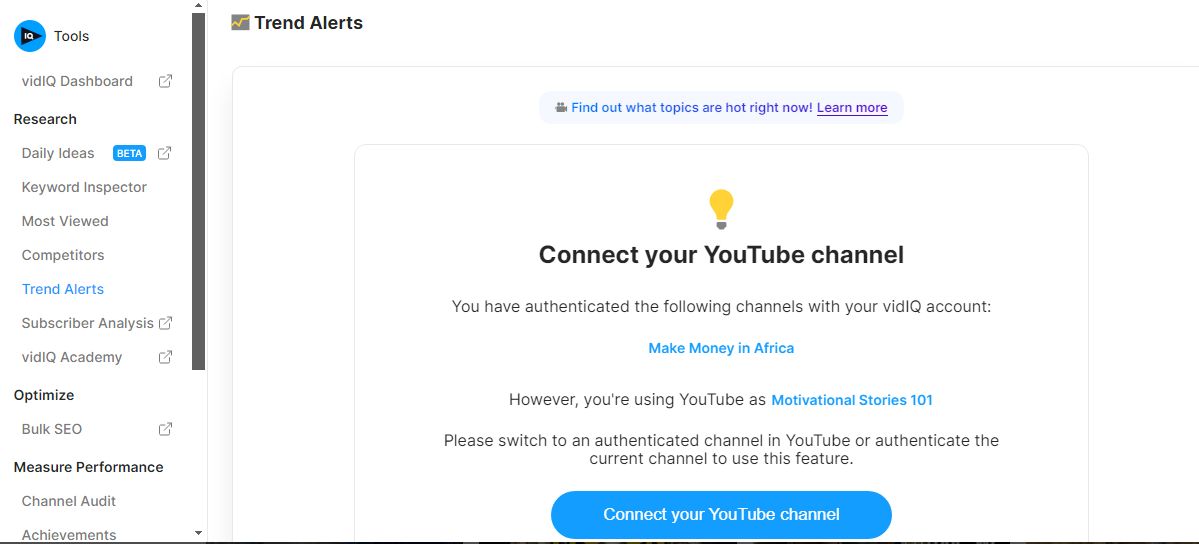
There are third-party keyword research tools that will show you keywords that are trending. These include vidIQ, TubeBuddy, Ahref, and Semrush. The tools will show you details like popular keywords, their search volumes, and the regions where they are trending. While these tools aren't 100% accurate, they can be a helpful guide to show you keywords that people in your niche are searching for.
Social Media Trends
Another place where you can find some trending topics for your YouTube videos is on social media. To do that, keep track of the trending hashtags on social media. You can also use social media listening tools to track trending hashtags and keywords.
Background Music
It's easy to assume that background noise isn't necessary as long as people can hear what you say. However, humans tend to get bored fast; therefore, you must think of a way to keep them engaged. One of these is by adding background music. This will help grab the viewer's attention and help you connect emotionally with the viewers.
Besides, using a great soundtrack will give people a reason to share the video. However, when adding music to your music videos, you should ensure it evokes the right emotions. You also need to ensure that you have the rights to use the songs, or your videos might get YouTube strikes.
Use Audible Audios
A great turnoff for YouTube videos is audio that isn't clear. Using such will only cause people to stop watching your videos. Remember that the ultimate goal of your audience is to not only view the video but also understand the points you are trying to put across. However, background music may suffice if you create a video of pictorial illustrations. But if it's a presentation, you should ensure that the oral sound is above the music.
Use a Call to Action
Remember that video viewers have the least amount of patience. After all, they are spoiled by the choice of content to view. You need to think of a way to creatively include a call to action in the right places in your videos, as the audience will increasingly drop out as the video progresses.
With most of the engagement dropping at the second or third minute, you should avoid putting your call to action at the end of the video. This is particularly true if you are a creator of long videos.

Include End Screens in Your Videos
YouTube allows you to add an end screen in the last 20 seconds of your videos. However, these graphics elements can help you promote your other videos or playlists. You can also leave room in this place to urge your viewers to like and subscribe to your channel. There are also YouTube subscribers from our shop if you'd like to add some directly.
If you collaborate with other channels or want to lead your viewers to your new channel, the end screen will enable you to do that. Finally, you can use an end screen to direct viewers to your site, where they can view more of your content. Therefore, when creating a video, ensure you have room to add an end screen.
Here are the steps to follow when adding end screens to your video:
- Upload your video and add all the elements, such as the title and description.
- You can now click on Next to be taken to the option of adding the end screen.
- You will see the Add End Screen option. Click Add.
- YouTube will provide you with several templates you can use to add your end screen. These will include a list of elements such as, Like Video+Playlist+Subscribe or Video+Subscribe+Playlist.
- If you want to add a custom-made end screen, you will see a drop-down menu on a pop-up screen; click +Element. You will have the option to choose between a playlist, channel, link, and subscribe.
- Under the Editor tab, you will see your end screen elements. You can click on them to change the elements, reposition them, or even delete them. For instance, you can add your most recent videos under the video elements.
- Change the end screen length to anything between 5 and 20 seconds.
- Click on the play button to preview what your end screen looks like.
- When satisfied with how your end screen looks, you can click on the save button.
If the video you want to add an end screen to is already published, here are the steps to follow:
- Go to YouTube Studio and click on the video to add the end screen.
- Keep scrolling until you see the End Screen tab on the left side. To open the End Screen editor, click on it.
- If you want to import a new video for your end screen, follow steps 4 to 7.
- Click Import From Video.
- You will be provided with options for selecting an end screen from your previous video uploads that had an end screen.
- Once you have chosen a video, the end screen will be added, just like in the previous video. However, you will still need to make a few changes, such as the timing of the end screen, depending on the length of your current videos. You can keep moving the end screen until it fits the current video's length.
- To confirm if your end screen video is playing like you want it to, click on Play. You can then save it to your video.
Use Top Thumbnails
Let's face it. Besides the title, the thumbnail is the number one factor determining whether people will click on your video. With suggested videos being a top source of traffic for YouTube videos, you need to give people a reason to view your videos. Here are some best practices when creating a YouTube thumbnail:
- Don't use clickbait. This is a mistake that most YouTubers make. Using clickbait promises the viewer something the video doesn't deliver.
- Use the right size of thumbnail. Your thumbnail should be visible and clearly show all elements, such as text.
- Use high-quality photos. Using dull, boring, and unappealing photos on your thumbnails affects their appeal. Therefore, you should use high-quality images that match the theme of your content. If you are using your photo as the thumbnail, don’t be afraid to use strong facial expressions.
- Include texts. While it's not a must to have text in a thumbnail, top YouTube videos usually include it. Ensure that the text evokes a feeling of curiosity, joy, and more. Use the right font depending on the type of video. For instance, if you are making a comedy video, you can use a font that depicts playfulness. But you should use a serious font for serious educational videos.
- Use contrasting colors. The choice of colors is one of the critical factors affecting the clickability of your YouTube videos. Use bold colors as they are more noticeable.

Create a Video Series
Organizing your videos in a series can make them more organized. But why is this necessary? When you put your videos in a playlist, once a video has ended, the next video automatically starts.
This means you can quickly hook a viewer on your page without them lifting a finger. This will not only help you get more views on YouTube but also help your ranking. When YouTube notices that your videos are hooking your viewers more, the videos will appear more under Suggested videos.
Here are some best practices for creating YouTube playlists:
Use Interesting Titles and Descriptions
When giving a name to your playlist, you must add relevant keywords to help with your ranking. While not all YouTubers include a playlist, it can be an essential element that can help your ranking when you include the focus keywords your viewers are searching for. Ensure that the video and description also clearly explain what the playlist is about.
When adding a playlist description, YouTube allows you to add up to 5000 characters. However, the description will be shortened in the search results. Therefore, ensure that you have added the most critical vital keywords in the first part of the description.
Put Your Best Videos First
When organizing your playlists, ensure your best videos are placed in the first part to hook viewers and increase watch time. Go to YouTube Studios and check the videos attracting the most people. You can also use third-party tools like Sprout Social and vidIQ for more powerful insights. But even as you do that, ensure all videos are contextually relevant to the niche.
Create a Narrative
Ensuring that all videos in your playlist have a narrative is essential. Following a TV episode's format will make your viewers more curious about what happens in the next video. This will increase your views and watch hours.
Create a Playlist for Visitors
Just like a website has a homepage where visitors land, you can borrow the same strategy for your YouTube video. The visitor's playlist should contain videos telling your visitors what your channel is about. For instance, you can tell your brand story in this playlist if you are a brand. You can name your playlist something like "New Here Playlist”.
Don’t Add a Lot of Videos
The role of a playlist is to make it easier for viewers to navigate around your videos. However, when you overwhelm them with many videos, the playlist will not help much. A good idea would be to have between 3 and 10 videos for each playlist. If the topic for your playlist has a high number of videos, you can list them in different playlists.
Understand YouTube SEO
As noted earlier, YouTube is a search engine; therefore, if you want your videos to rank highly on social media sites and Google, you must optimize your videos for the search engines. Here is a critical element of YouTube SEO to help your videos rank highly on the search engine:
Keyword Optimization
As a search engine, YouTube uses several factors to rank videos. One of these is the keyword. The target keyword is what you will be optimizing for. You should use keyword research tools such as Ahref and vidIQ to determine the right keywords to optimize your videos.
When doing keyword research, consider the competition level, as some keywords will be more challenging to rank for than others. Fortunately, the keyword research tools will show you the competition level; once you find the right keywords, you must use them in video titles, descriptions, and tags. Avoid overusing them, as this will be considered overstuffing, which can lead to a penalty.
Connect With Other Content Creators
You don't have to consider other content creators in your niche as the enemy, even when competing for the exact keywords. You can collaborate with them to expand your reach. For instance, you can create a video in collaboration with a creator in your niche. That way, you will benefit from their traffic while they benefit from yours.
Write a Blog Post in Your Niche
If you blog, you can write a blog post to complement your YouTube videos. When you do that, you can convert your site visitors into YouTube subscribers. On the other hand, some visitors would like to watch rather than read, and when you have a video, you will improve the user experience.
Share Your Videos on Social Media
You don't have to ignore the YouTube basics, as they can give you the best results. Sharing your YouTube video on social media can be a sure-proof way of increasing the number of viewers. When doing so, you need to be creative, as it is one of the most commonly used strategies by YouTubers.
To stand out on social media, you can give your viewers a preview of your videos. You can also find people who are talking about the video topic. You can then comment on their posts, giving your expertise on the subject, and a link to your YouTube video. You can also reach out to influencers in your industry and ask them to promote your video.
Final Thoughts
It's never easy to get views on YouTube. However, with a bit of effort and strategy, it is possible. By following the above topic, you can increase your YouTube views and grow your channels.