
You had a great time filming that day. You were living life to the fullest and had plenty of memories to share with your followers. But now the moment has passed, and you want to delete that Story from Instagram. How do you do it? Don't worry, it's not as hard as it seems! Deleting a Story on Instagram is really easy, once you know how to do it. In this article, we'll show you exactly how: step by step. we'll also discuss what happens when you delete a Story and answer some of the most frequently asked questions about Story deletion.
When to Delete Stories vs Highlights
Have you ever posted an Instagram story, only to regret it afterwards? Whether you just told one too many inside jokes, or you accidentally posted something you shouldn't have, deleting stories on Instagram is a totally normal thing to do. But here's the thing: when it comes to taking things down from your profile, there are two options when it comes to Instagram stories—you can either delete them completely or add them to your Highlights.
Deleting a story removes it completely. Stories you don't delete move to your private archive after 24 hours, where only you can see them. If you want a story to stay visible on your profile for longer, add it to a Highlight instead.
How to Delete an Instagram Story
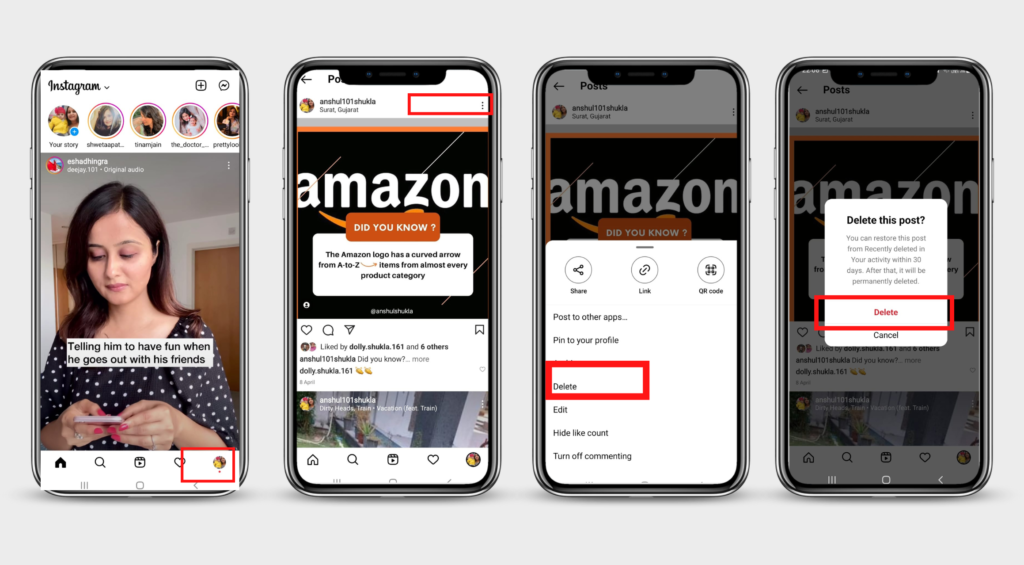
If you've posted a Story on Instagram that you'd rather not have out there, you don't need to worry—you can delete it easily. Before proceeding, note that once it's gone, it's gone for good—you won't be able to recover it in the future. Here's how you can delete your Instagram Story:
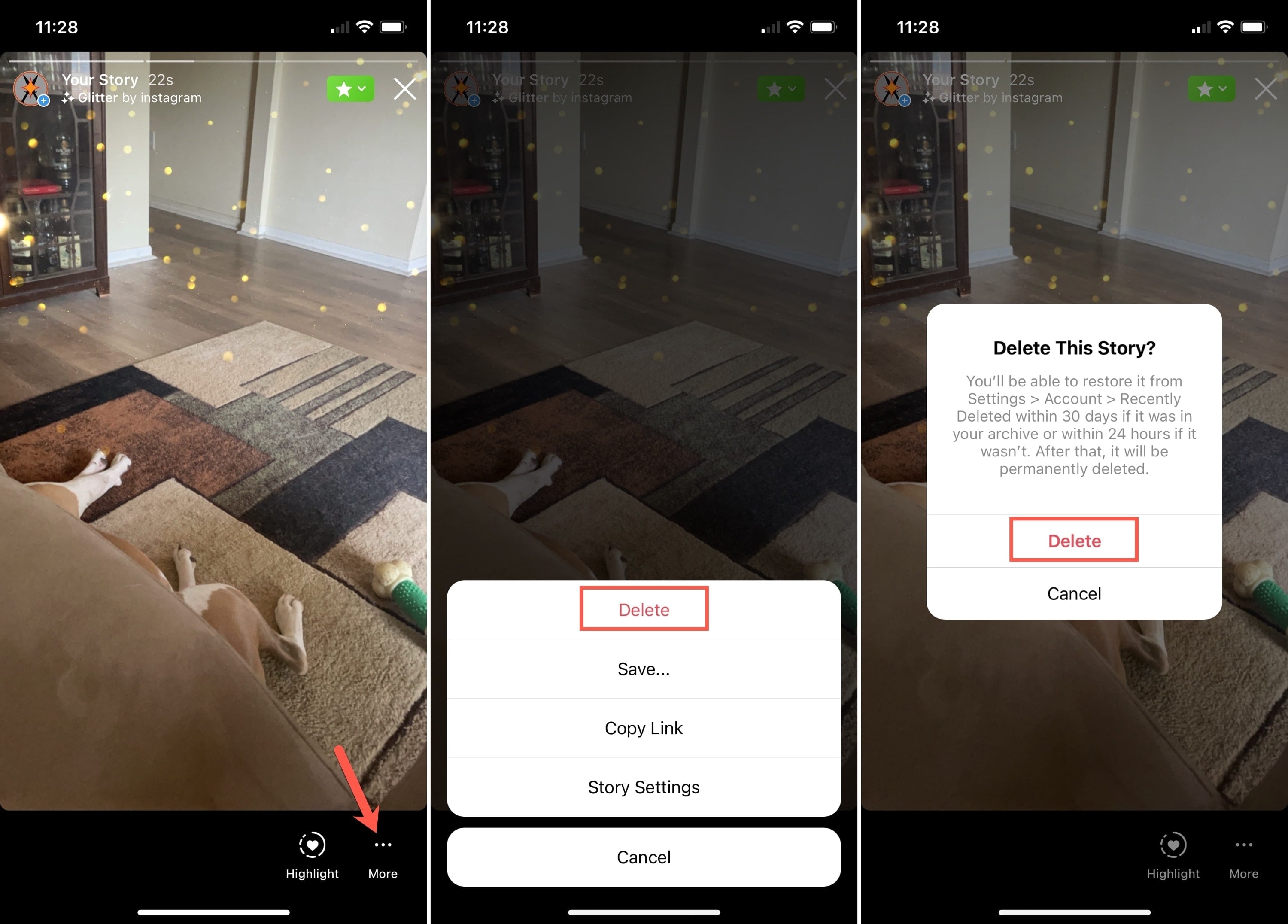
- Go to your profile page and click on the "Your Story" thumbnail in the top left corner, or swipe right from anywhere in Feed. This will open up your most recent story in full screen mode.
- From here, click on the three dots at the bottom right of the screen and select "Delete." This will bring up a confirmation popup asking if you want to delete this photo or video—select confirm and your story will be permanently removed.
- Stories older than 24 hours are in your archive. Open your profile, tap the menu in the top right corner, go to Archive, open the story you want to remove, tap More and choose Delete.
So now there's no need to panic if you hit "Share" by accident—just follow these steps and your story will be removed from Instagram!
What Happens After Deleting a Story
You might be wondering what happens after deleting a Story from your Instagram. It disappears for your followers right away and won't show up on your profile anymore. People who already saw it may remember it or have taken a screenshot, though, and deleting doesn't undo that. Deleted stories go to Recently deleted, where you can restore them for a limited time before they're removed for good.
How to Hide Unwanted Stories From Your Profile
If you don't want certain people to see your Stories at all, you can hide them from those people without deleting anything. Here's how:
- Open your profile and tap the menu in the top right corner
- Go to Settings and activity, then "Hide story and live"
- Select the people you want to hide your stories from
- Tap "Done"
These people won't see your stories anymore, while everyone else still can. You can change the list at any time.
Recycling Content by Adding Stories to Highlights
You may also want to delete a story because you'd like to re-use the content. No problem — Instagram makes it easy to recycle stories by adding them to your Highlights section. If you have a Story that you'd like to relive, head over to your profile and tap 'Highlights'. Here, you can add Stories from your archive as highlighted Stories — which will show up at the top of your profile for anyone who visits it. You can even give each collection of Highlights its own title, description and cover image! It's a great way to curate your stories and promote yourself or your business in the process.
Tips for Avoiding Mistakes With Stories
Nobody wants to accidentally post an embarrassing story on Instagram! Mistakes happen, but you can avoid them by following these tips.
Preview Before Posting
Don't rush and hit that post button right away—it's important to preview your story before posting and make sure everything looks good. If not, you can always edit or delete it before people have a chance to see it.
Don't Over Post/Post Too Much Info
Nobody likes when someone posts too many stories in a row or posts too much information at once. Try to be mindful of how often you post, and don't overload your followers with too much content in one go—spread it out across multiple days instead.
Plan Your Stories Ahead
The Instagram app doesn't let you schedule stories, but Meta Business Suite does. Planning your stories ahead means you're not rushing to publish something at the last minute.
Double Check Your Profile to Make Sure It's Gone
Once you've deleted your story, tap your profile picture to check that it's really gone.
If you change your mind, open Settings and activity and look for Recently deleted under Your activity. You can restore a deleted story from there for a limited time. Stories that expired after 24 hours and weren't deleted are in your Archive, where you can share them again.
FAQs
Do you have further questions about deleting an Instagram story? Here are some FAQs that may help.
Can I delete a story from someone’s profile before it has even been posted?
Yes, you can delete a story before it has even been posted to your profile. Simply click on the trash can icon located on the lower right corner of the story before you post it.
What happens if I delete a story from my profile?
When you delete a story from your profile, it will disappear from your profile and all of the other user's who viewed it. It also won't appear in hashtag and location pages.
How long do stories stay up after they are posted?
A story stays up for 24 hours, unless you delete it earlier. After that, it moves to your archive, which only you can see, unless you added it to a highlight.
Can I view my own deleted stories?
For a limited time, yes. Deleted stories go to Recently deleted, where you can view and restore them before Instagram removes them for good. Stories that simply expired are kept privately in your Archive.
Conclusion
Deleting a story on Instagram is simple and straightforward—just find the post, tap the three dots or swipe left, then tap delete. Remember that deleting posts or stories from your feed won't delete them from any other accounts; if you want to permanently delete your story, you'll have to go into your story settings and delete it from there. Remember, Instagram stories last for 24 hours, so think twice before you post something you may regret. By deleting an unwanted story, you can keep your feed neat and tidy and make sure you are always putting your best foot forward.