

If you are a social media creator or manager, you understand how difficult it can be to manage multiple accounts. You need to balance posting new content, responding to comments, and checking analytics. To overcome these challenges, you need an organized social media plan and calendar. This article will guide you in creating a social media calendar for more effective content scheduling.

What is a Social Media Calendar?
A social media calendar is essential for showing your upcoming content ideas, posts, and events in a single place. In addition to the details of the post publishing date and the posting times, it also includes tags, links, media, and copy to be posted to your social media channels.
The social media calendar acts as a point of reference for your team's schedules and ideas. It helps your team have a consistent posting schedule, collaborate better, and align their content with your greater business goals. The social media calendar can vary depending on their roles, but mainly consists of three types:
- Content calendars are based on a spreadsheet.
- Collaborative workflow tools.
- Integrated calendars.
Integrated social media calendars are usually built into social media management tools. This makes them suitable for complex workflows because of features such as:
- Drag and drop user interface.
- Ability to approve workflows
- Ability to publish across multiple channels
- Integrated analytics
Thanks to a WYSIWYG view, these calendars enable users to preview times and dates and see how their posts will look. Collaborative workflow content calendars are usually built on task or project management software. Mid-sized platforms mostly prefer these because they enable them to plan, operate, and schedule content that is natively built-in or with the necessary integrations.
Finally, spreadsheet-based content calendars act like a database template, allowing users to customize the sheet with the essential tabs and columns as per their social media content workflow.
Benefits of a Social Media Content Calendar
A content calendar is an essential part of a social media plan. Here are the benefits of having one:
Saves Your Time
Whether you are creating TikTok content or a WhatsApp marketing strategy, a social media calendar will ensure that your social content remains organized, saving you the time you would otherwise have spent brainstorming what to post or searching for new stories or trending topics to post. This can be especially important when you are managing multiple social media accounts. It also allows you to test different strategies to decide what works best for your target audience.
Have a Consistent Posting Schedule
While the posting frequency will depend on your needs, you need to have a regular posting schedule. A content calendar will provide your brand voice and style with consistency instead of being positioned unplanned.
Steps in Creating a Social Media Calendar
When creating a content calendar, you will need to follow these steps:
Determine Your Goal or KPI
Do you need to use Instagram reels to increase brand visibility? You need to ensure that the social media calendar you are creating aligns with your overall goals or KPIs. There is nothing wrong with having overarching KPI goals, but ensure that these are tailored to the goals of each platform.
For instance, you can use your preferred social media platform for brand awareness and engagement, which will also be its KPIs. In such a case, consider different metrics such as engagements and click-through rates.
Audit Your Social Media Platforms
Consider whether your current social media platforms are worth your time and effort. By doing a social media audit, you can rule out those accounts that end up wasting your time and effort. You can use the 5 Ws in journalism for your social media audit. These are who, where, what, why, and when. When using this technique, you will be capturing your content as the creator, the consumer's activities in driving engagement, and your competitor’s activities as rivals.
After getting the data of the first 3 Ws, you must compare the theme against the other Ws (where, when, what, and why) to get some key insights into your brand's social media performance, your target audience, and your competitors.
Understand Your Priorities
Remember that a content calendar is just an enabler of your social media strategy. Therefore, you want to ensure you understand what needs to be done and how you will do it. Consider also when this is going to happen. Remember that if you have no strategy, you will have no plan. This is why you need to prioritize the social media content calendar according to:
- Your goals. What exactly do you want to achieve with social media?
- Channels. What platform do you want to focus on for your social media activity?
- Content format or type? Which type of content do you plan to use?
- KPIs. What will you be tracking?
Build a Social Media Calendar
It's now time to consider the platform and tools for creating the calendar. The capabilities and tools will differ depending on the platform or calendar. Make sure you add all the essential fields of the calendar, such as:
- Posting date of the week
- The channel you will be posting on
- Date stamps and time
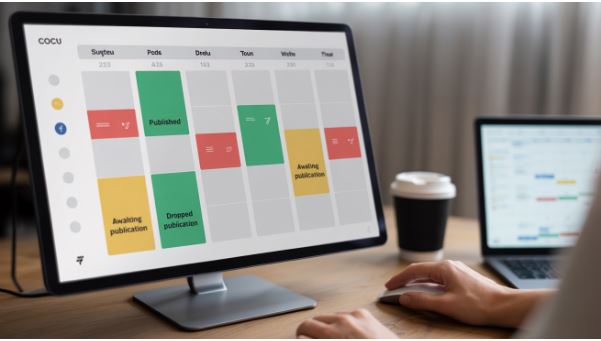
- Status of posts, such as published, dropped, and awaiting publication.
- Content pillars, such as opinions, features, products, and best practices.
- Media assets
- Copy of the post
- UTM parameters
- Review the Status, such as approved, rework, and rejected.
- Link to the published post.
These parameters will guide you in making the entry in the social media calendar. If creating a spreadsheet content calendar, add the above sheets to Excel or Google Sheets as the column headers. You can also use this list as inspiration and customize it according to your needs.
Final Thoughts
A social media content calendar can keep your content organized. It is, therefore, crucial to have a consistent and organized social media content calendar. It can also enable you to plan a schedule and manage content for different social media platforms, ensuring a balanced mix of content, posting at the right time, and good alignment with your overall social media goals.


