
Pinterest is one platform where the audience is already actively seeking solutions, ideas, and products. Since the audience has a high intent to buy, Pinterest is ideal for driving brand awareness and conversions. However, since the platform is a visual search engine, not all products are suitable for sale there.
The platform is perfect for highly visual, lifestyle-driven niches such as fashion and style, home decor, health and fitness, DIY projects, recipes, and food. If you have no products worth marketing on Pinterest, consider affiliate marketing. This is a good strategy for marketing products that people are already searching for. In this article, we guide you on how to do affiliate marketing on Pinterest.
What is Affiliate Marketing on Pinterest?
Pinterest affiliate marketing involves promoting another business's products by creating and sharing visual content, commonly known as pins. The pins, which usually include images and videos, often include a unique, tracked affiliate link to the products or services. After clicking these pins and purchasing through them, you receive a commission. Users of the platform can then save the pins to their collections and add them to wish lists or virtual mood boards.
Affiliate marketing on Pinterest differs from other platforms, such as TikTok and Instagram, because users actively search for solutions rather than passively scroll. Pinterest users may already be looking for different products, such as travel backpacks, productivity tools, or kitchen organization systems.
When you share affiliate links that match these users' searches, you connect them with the products they are looking for. This can be a good strategy for sharing affiliate links for products in visually appealing niches such as food, wellness, fashion, and home decor, as these categories already have an engaged audience.
Why Consider Pinterest Affiliate Marketing?
With over 600 million MAU (Monthly Active Users), Pinterest offers an unmatched platform for sharing affiliate marketing content. Additionally, the platform has been growing steadily, offering an unmatched SEM strategy where you share affiliate marketing content.
Here are some key reasons to consider Pinterest for affiliate marketing:
- High buy intent. Pinterest users are usually on the discovery stage in the buying journey and are actively searching for ideas or products. According to Pinterest, 80% of weekly pinners have discovered a new brand or product on the platform.
- Highly visual. Pinterest is a highly visual platform that enables businesses to showcase products in an engaging way, capturing users' attention and driving clicks.
- Longer shelf life. On most social media platforms, content tends to go stale quickly. However, on Pinterest, pins will remain visible and continue to drive traffic for months or even years.
- Targeted audience. Pinterest offers strong targeting options, enabling brands to reach specific audiences with particular interests or demographics.
What to Know Before Using Pinterest For Marketing?
According to the Pinterest website, there are certain guidelines that affiliate marketers should know before advertising on the platform.
- No duplicate accounts. The Pinterest guidelines require users to operate from only one Pinterest account. However, if you have multiple brands in different niches, you can create several accounts.
- Only share original content. You want to ensure the content you share on Pinterest is original and adds value to users. This is an area where Pinterest is very strict. If you are noted to be publishing another person’s or brand’s content, you will get into trouble.
- Be transparent when sharing affiliate links. If you are creating commercial content, you need to be transparent about its nature and that you are using affiliate links. According to the Federal Trade Commission, you should label your affiliate content as "Affiliated" or "Sponsored."
- No manipulating the Pinterest Algorithm. Creating extra accounts to pin content or flooding the platform with affiliate pins breaks Pinterest’s spam rules and can get your account suspended.
In addition to the above guidelines, you also need to ensure you follow the community guidelines so your content isn't considered spam.
How to Do Affiliate Marketing on Pinterest
After understanding the rules, you can now focus on conducting affiliate marketing on Pinterest. You can do that in several steps, such as:
Creating a Pinterest Business Account
For an effective Pinterest affiliate marketing strategy, you need to have a business account. Compared to a personal account, a business account offers additional features, such as performance tracking. You can create a business account by going to the Pinterest homepage and creating an account there.
If you already have an account, you can sign in by going to the Account management settings and clicking on the Convert Account. After this, you can follow the steps outlined by Pinterest.
Conduct Niche Research
Begin by creating pins for the Pinterest account and selecting your niche. If you don't already have a niche, start by researching. One of the tools you should use for the research is Pinterest Trends, which shows recent trends on Pinterest. You can search for the top trends across different countries and regions using filters such as age, gender, trend type, and interest.
You can also use third-party tools such as Google Trends, Ahrefs, or Semrush to collect more detailed data. After conducting sufficient research in your niche, you can select the option best suited to your business needs. When doing that, make sure you are careful, as this will determine the affiliate program you can join and the type of content you would like to create.
Join Your Affiliate Network and Create an Affiliate Program
You can now choose to join an affiliate run by an e-commerce site such as Amazon. However, if you already have an e-commerce site, you can create your own affiliate program. This will enable you to create some affiliate links, set up a key landing page, track results, send referral emails, and do much more.
Optimize Your Pinterest Profile
You want to ensure your profile is visually appealing and clearly reflects the products you sell. You can have a goal, such as reviewing the must-have products on Amazon in your profile description. You also want to ensure the logo and cover photo clearly represent what you do.
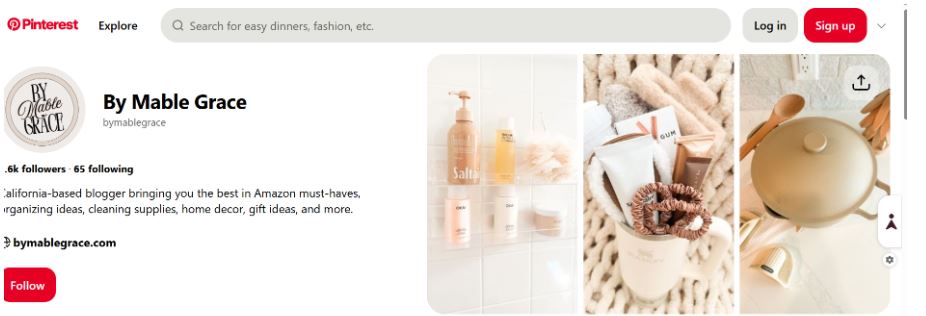
A good idea is to add the logo and brand to your profile picture to ensure that people easily recognize your brand. You can also add a high-quality product image and have branded boards, thereby enhancing your brand personality. You can choose board covers that match the color scheme or upload some branded graphics for the board covers. This will ensure that you have a cohesive presence on Pinterest. However, your design will differ depending on whether you are doing affiliate marketing for your brand or for a third-party site.
Get Pin Inspiration
The quality of your image will impact the number of clicks and conversions you get. Some Pinterest images are proven to work more successfully than others. Some of the successful pin formats can include:
- Video pins. While images are the most common types of pins, you can also upload video pins, helping you to stand out from the rest. Remember to add transcripts and captions to make the content more engaging and accessible.
- Informative pins. These are used by people searching for ideas or learning about new products on Pinterest. Therefore, you can create content that meets those needs, such as infographics.
- Shoppable catalog pin. This is a great way to increase your Pinterest Affiliate Sales. You can create a catalog of products, categorize them, and guide shoppers to your site.
- Pins of products in action. These are a great option for showing pinners how to best use or wear products in their daily lives.
- Seasonally relevant pins. You need to stay on top of the latest trends, which may include seasonally relevant content. With the upcoming holiday, you can create holiday-specific content or guides.
Pin Design
After getting plenty of inspiration, you can now create your own image using tools such as Adobe Photoshop and Canva. If you are getting started, consider using Canva, as it's free and easier to use. The tool also comes with templates specifically made for Pinterest, which will make everything easier for you.
Publish Your Pinterest Pins
Once you click on Create from the Pinterest page, the platform will guide you through the process. When doing that, make sure you are paying attention to SEO and GEO (generative engine optimization) best practices. This will ensure that people searching for keywords in your niche will further expand your content's reach. However, remember to avoid keyword stuffing, as it will cause your account to be penalized.
Post Consistently
Like other social media platforms, Pinterest rewards consistency, and the more you post, the higher the chances of getting discovered. If you want to be successful in your Pinterest affiliate marketing, you should create many pins, as it can take months before you see positive results.
Track Results
You can leverage Pinterest analytics to see if your efforts are bringing the desired results. However, you should remember that you need a business account to access Pinterest Analytics.
In Conclusion
Pinterest is one of the best platforms for affiliate marketing, especially in niches that sell highly visual content. Therefore, use this guide to earn money doing affiliate marketing on Pinterest.


